
Software Testing Procedure
Testing Pool
· TSO HD will act as the primary testing group for all new software. Software needs to be tested for a minimum of one week on TSO HD computers before the testing group is widened to all of TSO.
· If the software is particularly related to a certain department, department heads and lab managers may be voluntarily included after the first week of TSO testing or earlier if needed.
Add Office 365 Account to Mac Calendar
1. Open Calendar, found on your dock or in your Applications folder. You can also find it via Spotlight (the magnifying glass on the top right of your screen).
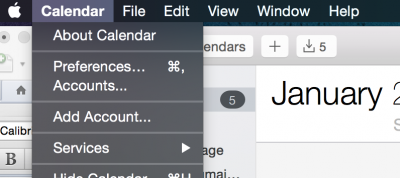
2. From the Calendar menu, select Preferences. In the dialog box that opens, click Accounts.
Using Crashplan
TSO provides CrashPlan client software licenses to CoC faculty, staff, and student employees with GT-owned mobile computing devices, such as laptops, tablets and phones. The CrashPlan client leverages the campus backup service administered by OIT.
Download and Installation and Setup
You can download, install and setup the CrashPlan client by following the directions here:
How do I Subscribe to TSO System Notices?
Mailing List:
TSO System Notices are posted to the cc-tso-availability@lists.gatech.edu mailing list, which you can join on the OIT SYMPA server.
- Go to the cc-tso-availability subscription page on the OIT SYMPA server.
- Click "Subscribe" on the left hand side of the page.
- Enter your email address.
- Click Submit.